
A texture can be present in an archive while the model points somewhere else. The Pack file inspector helps you find the referring file and field before editing a copy of the pack. It reads selected files in your browser and leaves the originals unchanged.
Start with one small archive
Extract the lesson ZIP to get four practice files: a broken and corrected Java ZIP, plus a broken and corrected Bedrock MCADDON. These are static file exercises, not playable add-ons or constructor exports. Select an inner practice archive, not the outer lesson ZIP.
- Under Choose a task, select Check one pack.
- In Pack file, choose
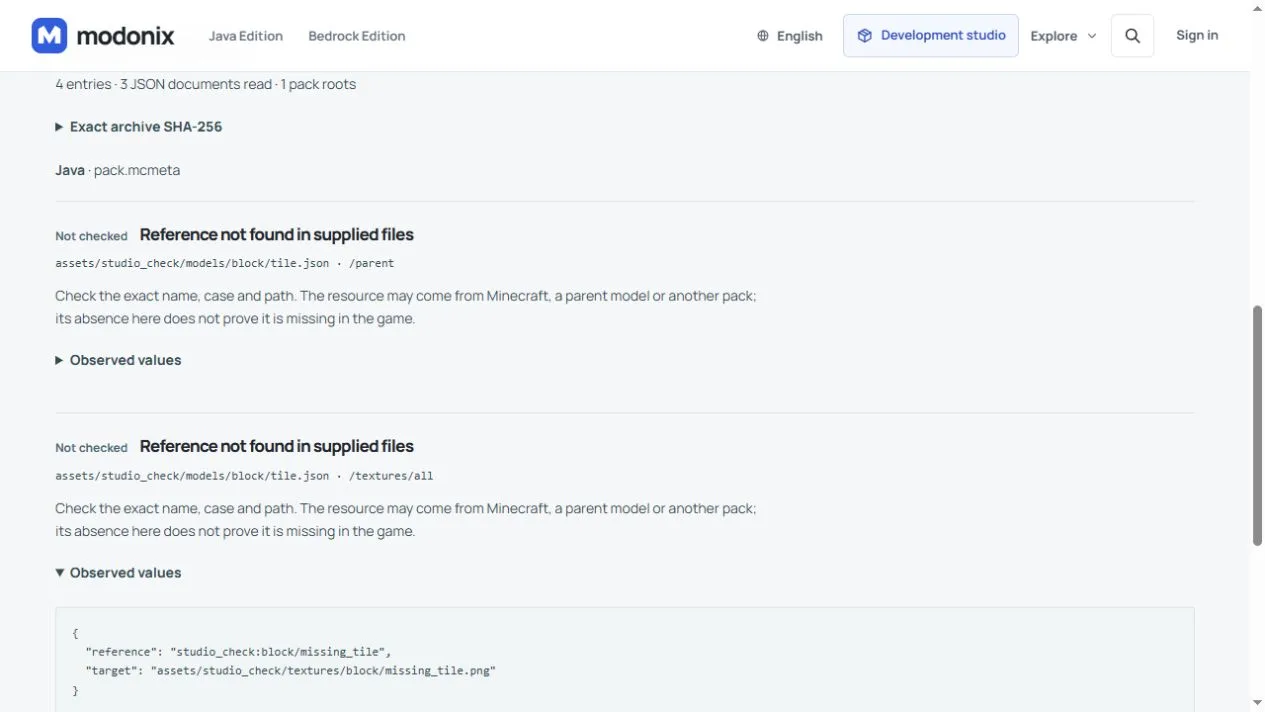
java-path-broken.zip, then select Inspect files. - Find Reference not found in supplied files for
assets/studio_check/models/block/tile.json. Open Observed values and check the field/textures/all.
Repair the reference, not the artwork
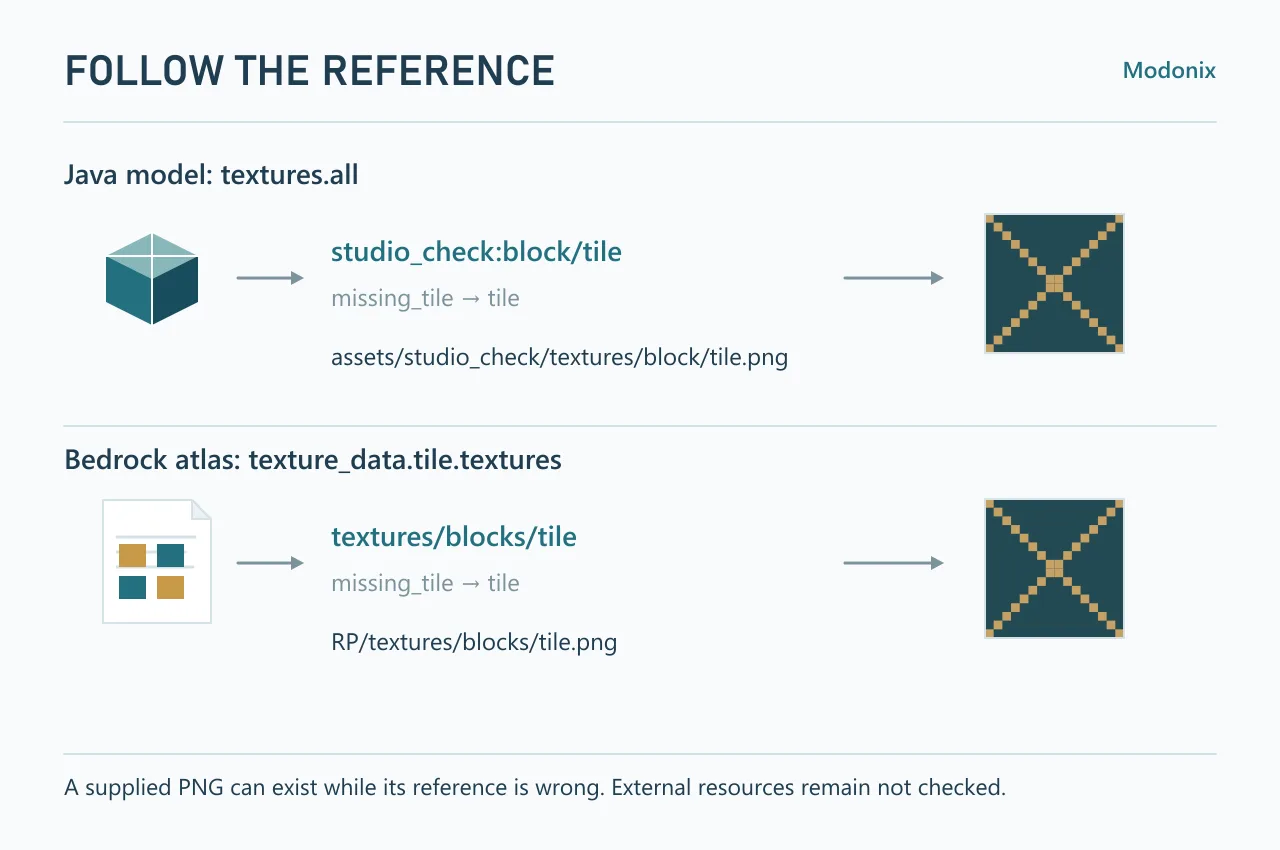
The model requests studio_check:block/missing_tile. The image actually supplied is assets/studio_check/textures/block/tile.png. In a copy of the extracted files, open assets/studio_check/models/block/tile.json with a text editor and change only the all value:
"textures": { "all": "studio_check:block/tile" }
Keep the namespace, spelling and letter case exact. The reference omits .png; the image filename includes it. Rebuild the ZIP with pack.mcmeta at its root, or inspect the supplied java-path-corrected.zip to compare the result. The local texture finding disappears. The vanilla parent minecraft:block/cube_all remains Not checked because its file is outside this archive. Do not delete a valid parent just to empty the report.
Two separate Bedrock corrections
Run Check one pack with bedrock-pair-broken.mcaddon. Its BP and RP folders form two pack roots. Review these two locations:
RP/textures/terrain_texture.json,/texture_data/tile/textures:textures/blocks/missing_tileshould betextures/blocks/tile, matching the supplied PNG.BP/manifest.json,/dependencies/0/version: the requested[9,0,0]does not match the supplied resource pack's[1,0,0]. In this exercise, correct the request to[1,0,0]; keep its UUID.
Inspect bedrock-pair-corrected.mcaddon. Those findings disappear; the behavior definition still has an unchecked area. A matching filename cannot establish that a block renders or behaves correctly.
Both Bedrock pack versions remain 1.0.0; “corrected” refers only to these file edits.
Recognize a built-in geometry reference
In our Harbor Workshop constructor export, the inspector points to harbor_workshop_BP/blocks/masonry_after.json and the field /minecraft:block/components/minecraft:geometry. Open Observed values: the name is minecraft:geometry.full_block.
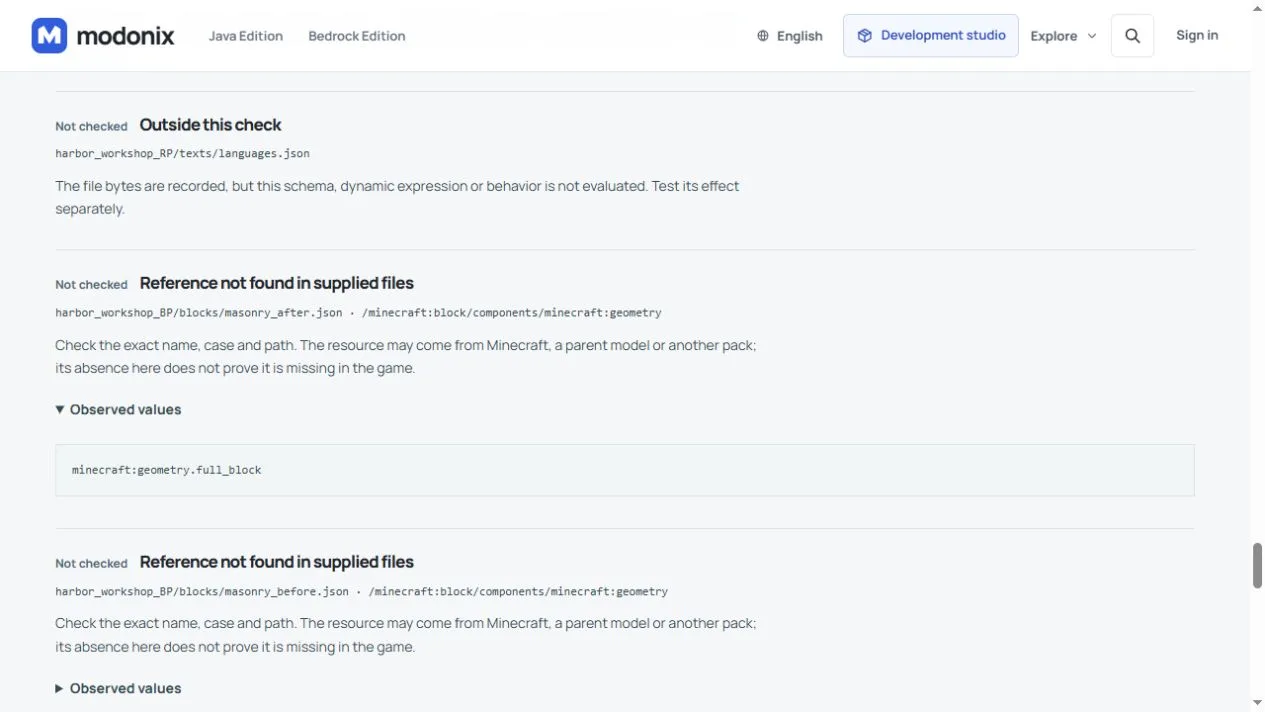
This is a reference to Minecraft’s built-in full-block geometry. Its definition is not a custom geometry file inside this export, so the inspector leaves it Not checked. Do not replace it with an invented filename to make the finding disappear. For your own block, read the expanded name first: a custom geometry needs the matching definition, while a built-in reference must be checked in its game context. Keep the reference intact and check the block in a copy of the world.
Read what the report actually establishes
Review marks something to investigate; Not checked leaves a question open. A resource absent from these files may come from Minecraft or another pack. Exact archive SHA-256 identifies the selected bytes; Exact file hashes lets you distinguish two copies with the same filename.
The inspector accepts ZIP, MCPACK and MCADDON up to 32 MB each, with bounded expansion and one level of nested MCPACKs. It does not inspect arbitrary JAR mods or worlds, execute scripts, scan for malware or choose a compatible game version. Use Cancel during a run or Clear files afterward. An archive rejected by a format or size limit has not received a clean report.
For a complete authoring project, continue with the Glassworks texture and constructor lesson. Keep its editable artwork, constructor source and exported game file distinct. This exercise diagnoses references; game behavior still needs its own check.
Comments 0
Share what worked, ask for help or reply to another player.
Use your Modonix account to join the discussion and manage your comments.
Sign in to commentNo comments yet. Share what worked for you.