
A first creator project is easier to finish when its result fits in one sentence: “this plank is my texture,” “that lantern is my model,” or “this mod now loads with my name.” Choose one of those loops before combining artwork, behavior and an entire world.
| What you enjoy making | Start with | A useful finish line |
|---|---|---|
| Pixel art and color | MC Assets plus your own texture editor | One original replacement texture appears on the intended block |
| Small shapes and props | Blockbench | An editable model and its texture work in the chosen game format |
| Java code | Fabric Example Mod | The untouched template loads, then one deliberate edit appears |
| Bedrock creatures and interactions | Add-On Starter | Identify one creature's artwork and behavior, then change one part |
One texture: know what you are replacing
MC Assets is useful before you paint because it helps identify the file behind a familiar Java block. Our 26.2 walkthrough follows assets → minecraft → textures → block → oak_planks.png. The full path matters as much as the filename.
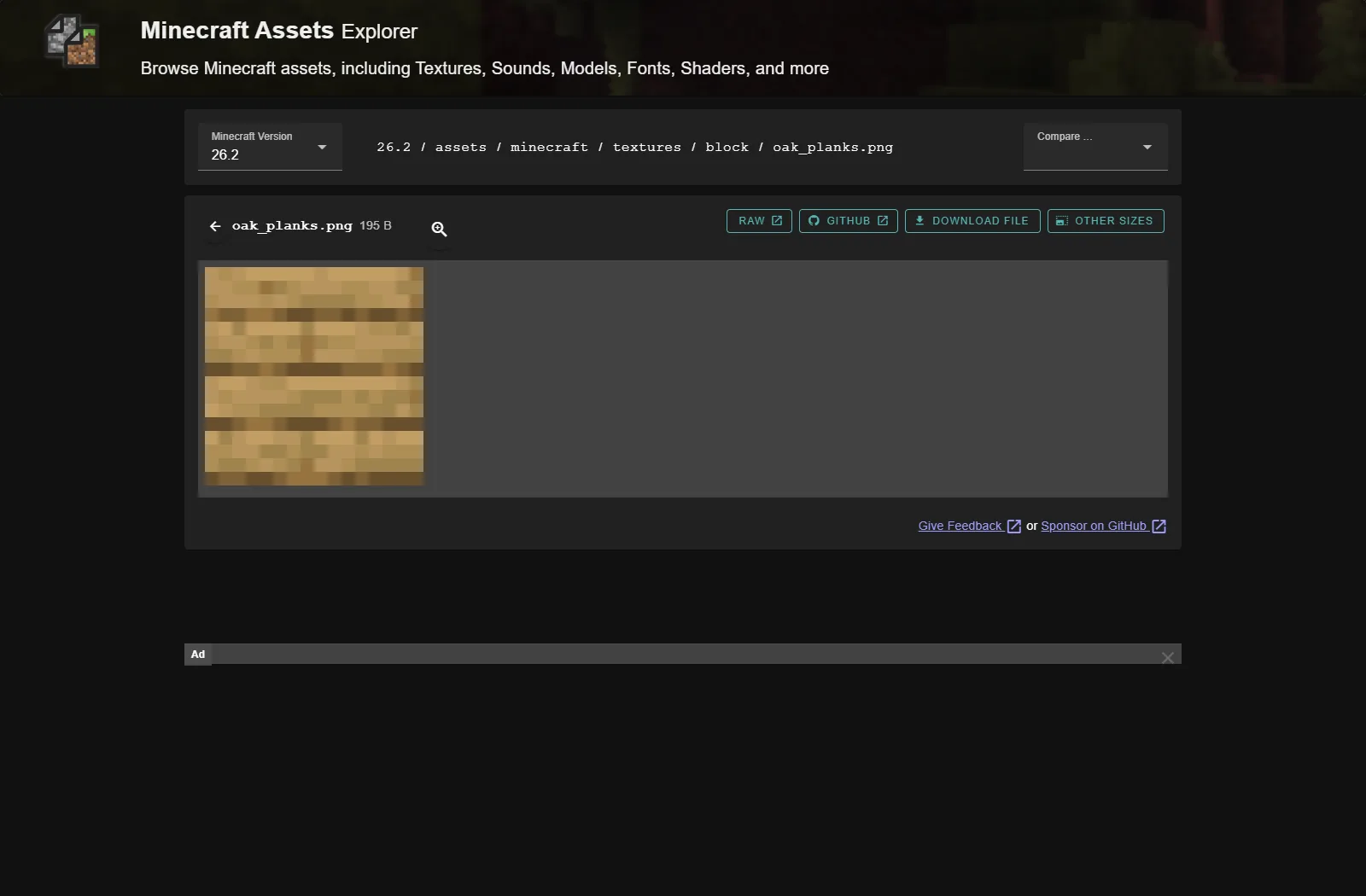
Use that reference to make your own texture. A plank for a small riverside storehouse is a manageable exercise: keep its board divisions readable, alter the grain or color, and view a complete wall beside stone and a door. Save editable artwork separately from the exported PNG so you can revise a busy pattern without starting again.
The browser finds references; it does not build or install a resource pack. Its Java folder layout also does not become a Bedrock manifest by renaming the archive. Choose the edition first, and keep the original artwork yours rather than bundling a collection of vanilla assets.
One model: make its shape readable
Choose the Blockbench lantern exercise if shape interests you more than code. A base, four narrow posts, a cap and a handle already create a recognizable object. Rotate the view often, then zoom out to the size it will occupy during play before adding tiny scratches or a complicated animation.
Our lantern was exported as a replacement for a standing vanilla lantern in Java 26.2. That distinction gives the exercise a clear boundary: the model changes appearance, while the ordinary lantern supplies its existing light and behavior. It does not create a separate recipe or a new block merely by being exported.
Keep the .bbmodel for editing and the game export for installation. A missing texture usually calls for checking its reference and path; repainting every face does not fix a model pointing at the wrong file.
One coded change: prove the loop first
The Fabric Example Mod route is appropriate when your idea requires Java behavior. Its demonstrated 26.2 source snapshot uses JDK 25. Build the untouched template, install its regular JAR in a matching Fabric instance, and confirm that it loads before changing identifiers.
For the first edit, change the display name and author, rebuild and look for the new name. That may feel small, but it connects editing, building and launching into a repeatable process. Changing the mod ID, packages and entrypoints all at once makes a simple naming exercise much harder to diagnose.
Prism Launcher can keep this experiment in a clearly named Java instance. A separate profile helps you recognize which game's mods and saves you are using; it does not compile the source for you.
One Bedrock creature: separate appearance from action
The Bedrock Add-On Starter supplies a larger connected example. Our walkthrough follows the Sheepomelon: shearing changes its rind-like appearance and produces the sample's deliberately unusual drops and fish interaction. The behavior pack, resource pack and script each contribute a different part.
Use the article's source-build route and a fresh world; its download is a source ZIP, not an MCADDON ready to open. Pick one change, such as a texture color, and return to the same creature to inspect it. Add another behavior after the first edit is easy to repeat. A finished small project is one whose source you can reopen, whose output you can identify, and whose result you can explain.
In this collection
This is a curated reading list. Check each project's files and requirements before installing; inclusion does not guarantee compatibility.
MC Assets: find the vanilla texture you actually need
Main hub · by Modonix Editorial
Inspect an exact vanilla asset as a reference before creating your own.
Blockbench: Make a Small Lantern, Then See It in Minecraft
Main hub · by Modonix Editorial
Build a small model and see how its shape reads inside Minecraft.
Fabric Example Mod: Build Your First Working Java Mod
Java · by MineCanvas Java Library
Start a Java code project from a working Fabric example.
Prism Launcher: give each Java setup its own home
Main hub · by Modonix Editorial
Keep the first creation and its required Java setup in a separate instance.
Minecraft Add-On Starter: Build and Explore the Wacky Zoo
Bedrock · by MineCanvas Bedrock Library
Explore the structure of a Bedrock behavior and resource pack through a working example.
Comments & questions
Share what worked, ask for help or reply to another player.
No comments yet. Share what worked for you.