
A friend can join your world and still see a different roof, sword or creature. Connecting everyone is one decision; delivering the same custom content is another. Start with the devices your group owns and the feature you actually want to share.
Choose the edition everyone can use
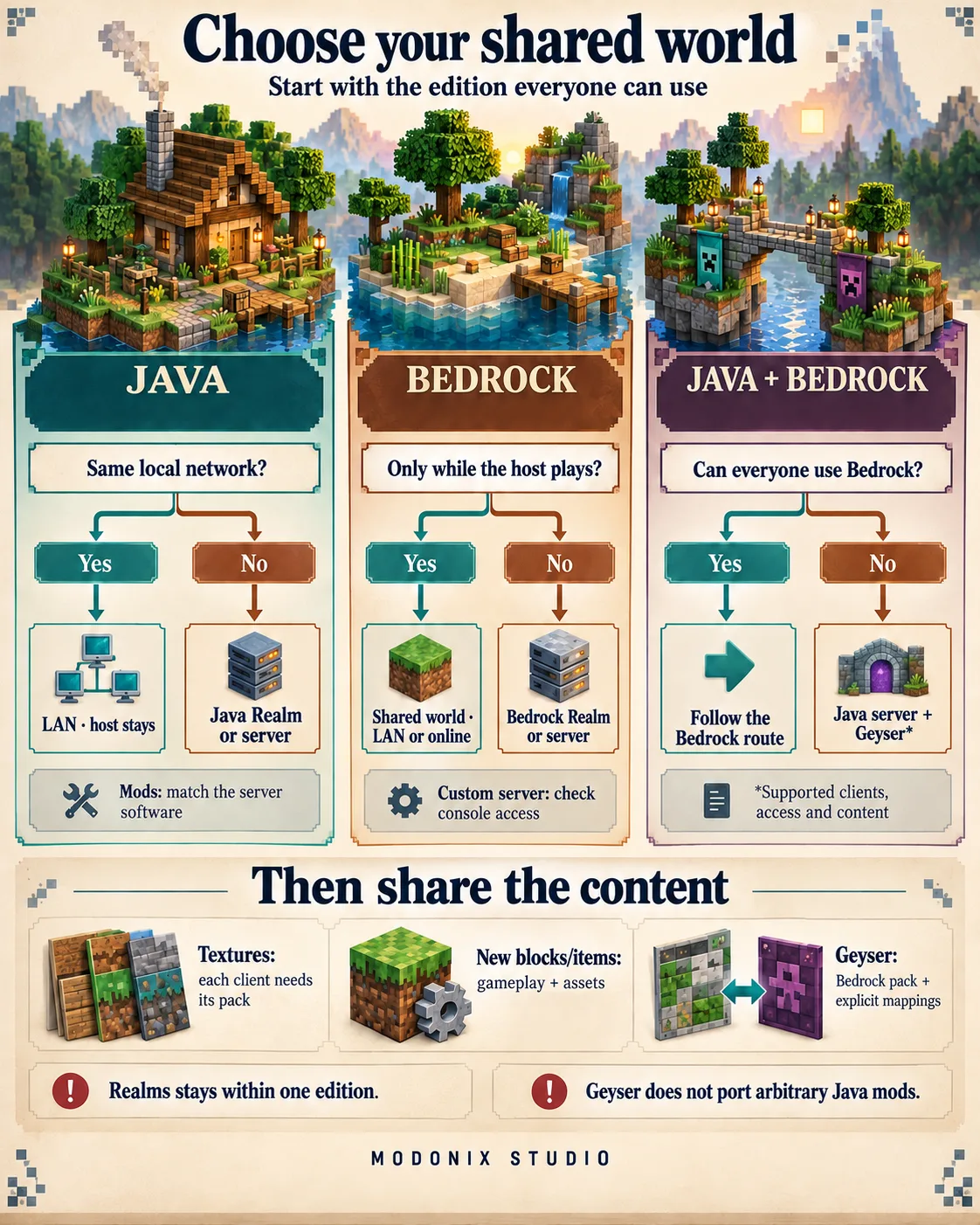
Java Edition connects Java players on Windows, macOS and Linux. Bedrock connects supported Windows, mobile and console versions. Windows can run either edition, so “we both play on PC” does not settle the question.
A Java Realm and a Bedrock Realm are separate services: neither joins the two editions together. If everyone can use Bedrock, a Bedrock world or Realm gives you its native cross-device route. A group keeping Java and Bedrock needs a deliberately configured bridge such as Geyser and content that the bridge can handle.
Decide when the world must stay available
- One session on the same local network: use LAN within the same edition. In Java, the host opens a world and chooses Open to LAN. The host must keep that session running.
- Bedrock friends in different places: join the host’s online world while the host is playing. This suits a planned building evening without keeping a separate server running.
- Friends dropping in at different times: choose a Realm for your edition when you want managed hosting. Members can play while the owner is away; invited members do not need their own Realms subscription.
- Control over server software and custom content: choose a dedicated server. Someone must maintain its software, world backups and content. A server can stay available without a player hosting a game, provided the server itself keeps running.
Java’s Friends List does not replace those hosting choices. Remote peer-to-peer world joining appeared in a 26.2 snapshot, then was removed before release. Do not follow that snapshot’s invitation steps as a released Java feature.
Check the console route before choosing a server
Bedrock on Windows and mobile offers Add Server for a custom address. The normal console server list is limited to featured servers; it does not provide the same arbitrary-address entry. A Geyser address alone therefore does not settle access for a console friend. For a group centered on consoles, consider a Bedrock world or Realm first.
Online play also depends on account multiplayer permissions and the platform’s requirements. Consoles generally require their platform’s online subscription. These requirements remain separate from buying a Realm or choosing server software.
What will the other player receive?
| Setup | Connection | Blocks and items | Textures | Models |
|---|---|---|---|---|
| Java with a resource pack | Java players | Existing content keeps its identity | Each client needs the pack | Each client needs its supported model assets |
| Java with content mods | Compatible Java setup | Follow the mod’s client/server requirements | Supplied by the required mod or pack | Supplied by the required mod or pack |
| Bedrock world or Realm | Bedrock players | Activate the needed behavior content | Attach the matching resource pack to the world | Include the required Bedrock geometry and resources |
| Bedrock Dedicated Server | Bedrock clients with an available join route | Compatible creator behavior packs | Server/world resource packs | Compatible Bedrock resources |
| Java server with Geyser | Java plus supported Bedrock clients | Vanilla translation; custom content needs explicit support | Separate Java and Bedrock packs | Bedrock assets and mappings for supported custom content |
Server-only Java mods are a separate case: some work without a client mod. A mod adding new client content may require installation on every Java player's game as well as the server. Follow that specific project's instructions and match the edition, loader and release.
Share the appearance as well as the world
Suppose you replace dirt with a turquoise pattern. It is still dirt, just as in our first Bedrock texture lesson. A resource pack does not create a new block’s gameplay merely by changing its picture. If that appearance is loaded only on your client, another player does not receive it just by standing beside you.
For a shared Java look, distribute the compatible resource pack or configure a server resource-pack offer. Servers can require acceptance; refusing a required pack prevents joining. For Bedrock, activate the resource pack on the shared world, alongside any behavior pack the add-on needs. The two-pack guide explains that distinction. Bedrock Dedicated Server can require the world’s texture packs with texturepack-required.
A custom creature’s shape also needs the correct model resources on the receiving client. Sending its name or gameplay behavior does not supply an arbitrary model from another edition. Likewise, a personal shader setup is not automatically everyone else’s view.
Bedrock Dedicated Server documents support for creator resource and behavior packs. Do not extend that promise to every Marketplace purchase: Minecraft’s Marketplace Add-On guidance excludes personal, non-Realms servers. Choose the hosting route supported by the actual content.
Plan custom content for Geyser
Geyser translates Bedrock connections for a Java server. It does not turn a Java mod JAR into a Bedrock add-on, automatically convert a Java resource pack, or generate all custom-item and block mappings for you.
An administrator can supply a Bedrock resource pack and explicit mappings for supported custom items and blocks. Geyser’s API also allows selected non-vanilla modded items to be registered. That is a deliberate integration for particular content, not a promise that an arbitrary Fabric, Forge or NeoForge modpack will work on Bedrock. Models, interactions and other features still need their own support.
As of October 16, 2026, Geyser’s documentation lists Bedrock 26.30–26.52 and Java 26.3. Check the current supported versions before choosing a server or updating the group; translation does not remove edition differences.
Make the choice around your build
For a family building a village from ordinary blocks, start with a shared edition and a convenient world schedule. If everyone wants the same timber finish, add a shared resource pack to that plan.
For a workshop built around new Java machines, choose the required Java mod setup first and then its hosting. For a mixed-edition town, ask the administrator which custom blocks, item appearances and models have explicit Bedrock support before making them essential to the build.
Once the group has a suitable connection and content route, our shared Java world collection covers a different choice: maps, travel stops and permissions that help people use the world together.
Comments 0
Share what worked, ask for help or reply to another player.
Use your Modonix account to join the discussion and manage your comments.
Sign in to commentNo comments yet. Share what worked for you.